Categories &
Functions List
- BetaDistribution
- BinomialDistribution
- BirnbaumSaundersDistribution
- BurrDistribution
- ExponentialDistribution
- ExtremeValueDistribution
- GammaDistribution
- GeneralizedExtremeValueDistribution
- GeneralizedParetoDistribution
- HalfNormalDistribution
- InverseGaussianDistribution
- LogisticDistribution
- LoglogisticDistribution
- LognormalDistribution
- LoguniformDistribution
- MultinomialDistribution
- NakagamiDistribution
- NegativeBinomialDistribution
- NormalDistribution
- PiecewiseLinearDistribution
- PoissonDistribution
- RayleighDistribution
- RicianDistribution
- tLocationScaleDistribution
- TriangularDistribution
- UniformDistribution
- WeibullDistribution
- betafit
- betalike
- binofit
- binolike
- bisafit
- bisalike
- burrfit
- burrlike
- evfit
- evlike
- expfit
- explike
- gamfit
- gamlike
- geofit
- gevfit_lmom
- gevfit
- gevlike
- gpfit
- gplike
- gumbelfit
- gumbellike
- hnfit
- hnlike
- invgfit
- invglike
- logifit
- logilike
- loglfit
- logllike
- lognfit
- lognlike
- nakafit
- nakalike
- nbinfit
- nbinlike
- normfit
- normlike
- poissfit
- poisslike
- raylfit
- rayllike
- ricefit
- ricelike
- tlsfit
- tlslike
- unidfit
- unifit
- wblfit
- wbllike
- betacdf
- betainv
- betapdf
- betarnd
- binocdf
- binoinv
- binopdf
- binornd
- bisacdf
- bisainv
- bisapdf
- bisarnd
- burrcdf
- burrinv
- burrpdf
- burrrnd
- bvncdf
- bvtcdf
- cauchycdf
- cauchyinv
- cauchypdf
- cauchyrnd
- chi2cdf
- chi2inv
- chi2pdf
- chi2rnd
- copulacdf
- copulapdf
- copularnd
- evcdf
- evinv
- evpdf
- evrnd
- expcdf
- expinv
- exppdf
- exprnd
- fcdf
- finv
- fpdf
- frnd
- gamcdf
- gaminv
- gampdf
- gamrnd
- geocdf
- geoinv
- geopdf
- geornd
- gevcdf
- gevinv
- gevpdf
- gevrnd
- gpcdf
- gpinv
- gppdf
- gprnd
- gumbelcdf
- gumbelinv
- gumbelpdf
- gumbelrnd
- hncdf
- hninv
- hnpdf
- hnrnd
- hygecdf
- hygeinv
- hygepdf
- hygernd
- invgcdf
- invginv
- invgpdf
- invgrnd
- iwishpdf
- iwishrnd
- jsucdf
- jsupdf
- laplacecdf
- laplaceinv
- laplacepdf
- laplacernd
- logicdf
- logiinv
- logipdf
- logirnd
- loglcdf
- loglinv
- loglpdf
- loglrnd
- logncdf
- logninv
- lognpdf
- lognrnd
- mnpdf
- mnrnd
- mvncdf
- mvnpdf
- mvnrnd
- mvtcdf
- mvtpdf
- mvtrnd
- mvtcdfqmc
- nakacdf
- nakainv
- nakapdf
- nakarnd
- nbincdf
- nbininv
- nbinpdf
- nbinrnd
- ncfcdf
- ncfinv
- ncfpdf
- ncfrnd
- nctcdf
- nctinv
- nctpdf
- nctrnd
- ncx2cdf
- ncx2inv
- ncx2pdf
- ncx2rnd
- normcdf
- norminv
- normpdf
- normrnd
- plcdf
- plinv
- plpdf
- plrnd
- poisscdf
- poissinv
- poisspdf
- poissrnd
- raylcdf
- raylinv
- raylpdf
- raylrnd
- ricecdf
- riceinv
- ricepdf
- ricernd
- tcdf
- tinv
- tpdf
- trnd
- tlscdf
- tlsinv
- tlspdf
- tlsrnd
- tricdf
- triinv
- tripdf
- trirnd
- unidcdf
- unidinv
- unidpdf
- unidrnd
- unifcdf
- unifinv
- unifpdf
- unifrnd
- vmcdf
- vminv
- vmpdf
- vmrnd
- wblcdf
- wblinv
- wblpdf
- wblrnd
- wienrnd
- wishpdf
- wishrnd
- adtest
- anova
- anova1
- anova2
- anovan
- bartlett_test
- barttest
- binotest
- chi2gof
- chi2test
- correlation_test
- fishertest
- friedman
- hotelling_t2test
- hotelling_t2test2
- kruskalwallis
- kstest
- kstest2
- levene_test
- manova1
- mcnemar_test
- multcompare
- ranksum
- regression_ftest
- regression_ttest
- runstest
- sampsizepwr
- signrank
- signtest
- tiedrank
- ttest
- ttest2
- vartest
- vartest2
- vartestn
- ztest
- ztest2
Class Definition: BirnbaumSaundersDistribution
statistics: BirnbaumSaundersDistribution
Birnbaum-Saunders probability distribution object.
A BirnbaumSaundersDistribution object consists of parameters, a
model description, and sample data for a Birnbaum-Saunders probability
distribution.
The Birnbaum-Saunders distribution is a continuous probability distribution that models the time to failure of materials subjected to cyclic loading. It is defined by scale parameter beta and shape parameter gamma.
There are several ways to create a BirnbaumSaundersDistribution
object.
- Fit a distribution to data using the
fitdistfunction. - Create a distribution with fixed parameter values using the
makedistfunction. - Use the constructor
BirnbaumSaundersDistribution (beta,
 gamma)
to create a Birnbaum-Saunders distribution with fixed parameter values beta and gamma. - Use the static method
BirnbaumSaundersDistribution.fit
 (x, alpha, censor, freq, options)
to fit a distribution to the data in x using the same input arguments as thebisafitfunction.
It is highly recommended to use fitdist and makedist
functions to create probability distribution objects, instead of the class
constructor or the aforementioned static method.
Further information about the Birnbaum-Saunders distribution can be found at https://en.wikipedia.org/wiki/Birnbaum%E2%80%93Saunders_distribution
See also: fitdist, makedist, bisacdf, bisainv, bisapdf, bisarnd, bisafit, bisalike, bisastat
Source Code: BirnbaumSaundersDistribution
The BirnbaumSaundersDistribution class contains the following properties:
A positive scalar value characterizing the scale of the
Birnbaum-Saunders distribution. You can access the beta
property using dot name assignment.
Example: 1
Create a Birnbaum-Saunders distribution with default parameters
pd = makedist ("BirnbaumSaunders")
pd =
  BirnbaumSaundersDistribution

  Birnbaum-Saunders distribution
     beta = 1
    gamma = 1
Query parameter 'beta' (scale parameter)
pd.beta
ans = 1
Set parameter 'beta'
pd.beta = 2
pd =
  BirnbaumSaundersDistribution

  Birnbaum-Saunders distribution
     beta = 2
    gamma = 1
Use this to initialize or modify the scale parameter of a Birnbaum-Saunders distribution. The scale parameter must be a positive real scalar.
Example: 2
Create a Birnbaum-Saunders distribution object by calling its constructor
pd = BirnbaumSaundersDistribution (1.5, 0.5)
pd =
  BirnbaumSaundersDistribution

  Birnbaum-Saunders distribution
     beta = 1.5
    gamma = 0.5
Query parameter 'beta'
pd.beta
ans = 1.5000
This demonstrates direct construction with a specific scale parameter, useful for modeling time-to-failure data with a known scale.
A positive scalar value characterizing the shape of the
Birnbaum-Saunders distribution. You can access the gamma
property using dot name assignment.
Example: 1
Create a Birnbaum-Saunders distribution with default parameters
pd = makedist ("BirnbaumSaunders")
pd =
  BirnbaumSaundersDistribution

  Birnbaum-Saunders distribution
     beta = 1
    gamma = 1
Query parameter 'gamma' (shape parameter)
pd.gamma
ans = 1
Set parameter 'gamma'
pd.gamma = 0.8
pd =
  BirnbaumSaundersDistribution

  Birnbaum-Saunders distribution
     beta =   1
    gamma = 0.8
Use this to initialize or modify the shape parameter in a Birnbaum-Saunders distribution. The shape parameter must be a positive real scalar.
Example: 2
Create a Birnbaum-Saunders distribution object by calling its constructor
pd = BirnbaumSaundersDistribution (1.5, 0.5)
pd =
  BirnbaumSaundersDistribution

  Birnbaum-Saunders distribution
     beta = 1.5
    gamma = 0.5
Query parameter 'gamma'
pd.gamma
ans = 0.5000
This shows how to set the shape parameter directly via the constructor, ideal for modeling specific variability in failure times.
A character vector specifying the name of the probability distribution object. This property is read-only.
A scalar integer value specifying the number of parameters characterizing the probability distribution. This property is read-only.
A cell array of character vectors with each element containing the name of a distribution parameter. This property is read-only.
A cell array of character vectors with each element containing a short description of a distribution parameter. This property is read-only.
A numeric vector containing the values of the distribution
parameters. This property is read-only. You can change the distribution
parameters by assigning new values to the beta and gamma
properties.
A numeric matrix containing the variance-covariance of the parameter estimates. Diagonal elements contain the variance of each estimated parameter, and non-diagonal elements contain the covariance between the parameter estimates. The covariance matrix is only meaningful when the distribution was fitted to data. If the distribution object was created with fixed parameters, or a parameter of a fitted distribution is modified, then all elements of the variance-covariance are zero. This property is read-only.
A logical vector specifying which parameters are fixed and
which are estimated. true values correspond to fixed parameters,
false values correspond to parameter estimates. This property is
read-only.
A numeric vector specifying the truncation interval for the
probability distribution. First element contains the lower boundary,
second element contains the upper boundary. This property is read-only.
You can only truncate a probability distribution with the
truncate method.
A logical scalar value specifying whether a probability distribution is truncated or not. This property is read-only.
A scalar structure containing the following fields:
-
data: a numeric vector containing the data used for distribution fitting. -
cens: a numeric vector of logical values indicating censoring information corresponding to the elements of the data used for distribution fitting. If no censoring vector was used for distribution fitting, then this field defaults to an empty array. -
freq: a numeric vector of non-negative integer values containing the frequency information corresponding to the elements of the data used for distribution fitting. If no frequency vector was used for distribution fitting, then this field defaults to an empty array.
The BirnbaumSaundersDistribution class offers the following public methods:
BirnbaumSaundersDistribution: p = cdf (pd, x)
BirnbaumSaundersDistribution: p = cdf (pd, x,
'upper')
p = cdf (pd, x) computes the CDF of the
probability distribution object, pd, evaluated at the values in
x.
p = cdf (…, returns the complement of
the CDF of the probability distribution object, pd, evaluated at
the values in x.
'upper')
Example: 1
Plot various CDFs from the Birnbaum-Saunders distribution
 x = 0:0.01:5;
 pd1 = makedist ("BirnbaumSaunders", "beta", 1, "gamma", 0.2);
 pd2 = makedist ("BirnbaumSaunders", "beta", 1, "gamma", 0.5);
 pd3 = makedist ("BirnbaumSaunders", "beta", 1, "gamma", 0.8);
 p1 = cdf (pd1, x);
 p2 = cdf (pd2, x);
 p3 = cdf (pd3, x);
 plot (x, p1, "-b", x, p2, "-g", x, p3, "-r")
 grid on
 legend ({"beta = 1, gamma = 0.2", "beta = 1, gamma = 0.5", "beta = 1, gamma = 0.8"}, ...
         "location", "southeast")
 title ("Birnbaum-Saunders CDF")
 xlabel ("Time to failure")
 ylabel ("Cumulative probability")
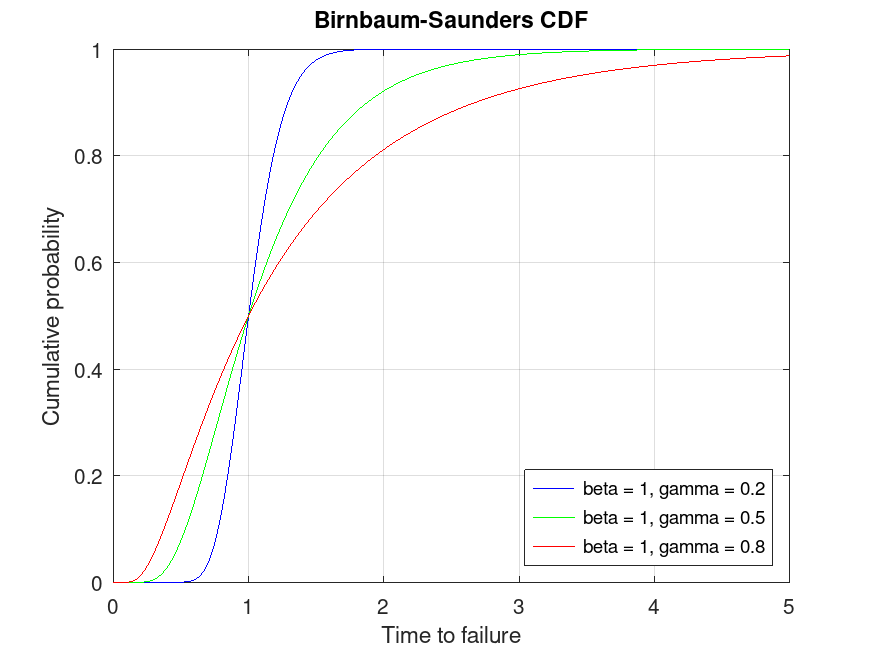
Use this to compute and visualize the cumulative distribution function for different Birnbaum-Saunders distributions, showing how probability accumulates over time-to-failure.
BirnbaumSaundersDistribution: x = icdf (pd, p)
x = icdf (pd, p) computes the quantile (the
inverse of the CDF) of the probability distribution object, pd,
evaluated at the values in p.
Example: 1
Plot various iCDFs from the Birnbaum-Saunders distribution
 p = 0.001:0.001:0.999;
 pd1 = makedist ("BirnbaumSaunders", "beta", 1, "gamma", 0.2);
 pd2 = makedist ("BirnbaumSaunders", "beta", 1, "gamma", 0.5);
 pd3 = makedist ("BirnbaumSaunders", "beta", 1, "gamma", 0.8);
 x1 = icdf (pd1, p);
 x2 = icdf (pd2, p);
 x3 = icdf (pd3, p);
 plot (p, x1, "-b", p, x2, "-g", p, x3, "-r")
 grid on
 legend ({"beta = 1, gamma = 0.2", "beta = 1, gamma = 0.5", "beta = 1, gamma = 0.8"}, ...
         "location", "northwest")
 title ("Birnbaum-Saunders iCDF")
 xlabel ("Probability")
 ylabel ("Time to failure")
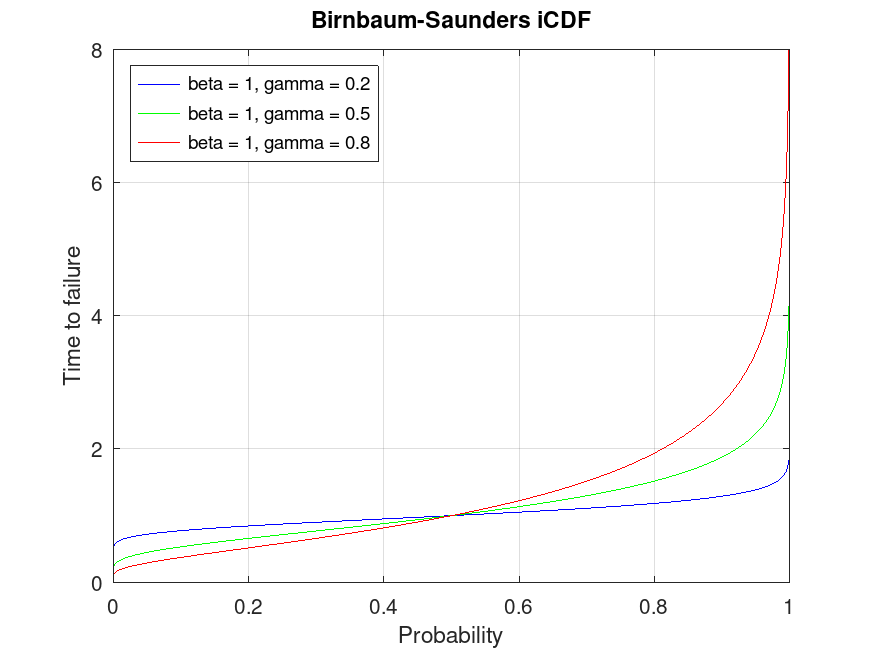
This demonstrates the inverse CDF (quantiles) for Birnbaum-Saunders distributions, useful for finding the time-to-failure corresponding to given probabilities.
BirnbaumSaundersDistribution: r = iqr (pd)
r = iqr (pd) computes the interquartile range of the
probability distribution object, pd.
Example: 1
Compute the interquartile range for a Birnbaum-Saunders distribution
pd = makedist ("BirnbaumSaunders", "beta", 1, "gamma", 0.5)
pd =
  BirnbaumSaundersDistribution

  Birnbaum-Saunders distribution
     beta =   1
    gamma = 0.5
iqr_value = iqr (pd)
iqr_value = 0.6840
Use this to calculate the interquartile range, which measures the spread of the middle 50% of the distribution, useful for understanding variability in failure times.
BirnbaumSaundersDistribution: m = mean (pd)
m = mean (pd) computes the mean of the probability
distribution object, pd.
Example: 1
Compute the mean for different Birnbaum-Saunders distributions
 pd1 = makedist ("BirnbaumSaunders", "beta", 1, "gamma", 0.2);
 pd2 = makedist ("BirnbaumSaunders", "beta", 1, "gamma", 0.5);
 mean1 = mean (pd1)
mean1 = 1.0200
mean2 = mean (pd2)
mean2 = 1.1250
This shows how to compute the expected time to failure for Birnbaum-Saunders distributions with different shape parameters.
BirnbaumSaundersDistribution: m = median (pd)
m = median (pd) computes the median of the probability
distribution object, pd.
Example: 1
Compute the median for different Birnbaum-Saunders distributions
 pd1 = makedist ("BirnbaumSaunders", "beta", 1, "gamma", 0.2);
 pd2 = makedist ("BirnbaumSaunders", "beta", 1, "gamma", 0.5);
 median1 = median (pd1)
median1 = 1
median2 = median (pd2)
median2 = 1
Use this to find the median time to failure, which splits the distribution into two equal probability halves.
BirnbaumSaundersDistribution: nlogL = negloglik (pd)
nlogL = negloglik (pd) computes the negative
loglikelihood of the probability distribution object, pd.
Example: 1
Compute the negative loglikelihood for a fitted Birnbaum-Saunders distribution
pd = makedist ("BirnbaumSaunders", "beta", 1, "gamma", 0.5)
pd =
  BirnbaumSaundersDistribution

  Birnbaum-Saunders distribution
     beta =   1
    gamma = 0.5
 randg ("seed", 21);
 data = random (pd, 100, 1);
 pd_fitted = fitdist (data, "BirnbaumSaunders")
pd_fitted =
  BirnbaumSaundersDistribution

  Birnbaum-Saunders distribution
     beta = 1.00751   [0.909051, 1.11663]
    gamma = 0.54495   [0.474425, 0.625959]
nlogL = negloglik (pd_fitted)
nlogL = -78.996
This is useful for assessing the fit of a Birnbaum-Saunders distribution to data, lower values indicate a better fit.
BirnbaumSaundersDistribution: ci = paramci (pd)
BirnbaumSaundersDistribution: ci = paramci (pd, Name, Value)
ci = paramci (pd) computes the lower and upper
boundaries of the 95% confidence interval for each parameter of the
probability distribution object, pd.
ci = paramci (pd, Name, Value) computes
the
confidence intervals with additional options specified by
Name-Value pair arguments listed below.
| Name | Value | |
|---|---|---|
'Alpha' | A scalar value in the range specifying the significance level for the confidence interval. The default value 0.05 corresponds to a 95% confidence interval. | |
'Parameter' | A character vector or a cell array of
character vectors specifying the parameter names for which to compute
confidence intervals. By default, paramci computes confidence
intervals for all distribution parameters. |
paramci is meaningful only when pd is fitted to data,
otherwise an empty array, [], is returned.
Example: 1
Compute confidence intervals for parameters of a fitted Birnbaum-Saunders distribution
pd = makedist ("BirnbaumSaunders", "beta", 1, "gamma", 0.5)
pd =
  BirnbaumSaundersDistribution

  Birnbaum-Saunders distribution
     beta =   1
    gamma = 0.5
 randg ("seed", 21);
 data = random (pd, 1000, 1);
 pd_fitted = fitdist (data, "BirnbaumSaunders")
pd_fitted =
  BirnbaumSaundersDistribution

  Birnbaum-Saunders distribution
     beta = 0.974238   [0.945964, 1.00336]
    gamma = 0.489944   [0.468936, 0.511894]
ci = paramci (pd_fitted, "Alpha", 0.05)
ci =

   0.9460   0.4689
   1.0034   0.5119
Use this to obtain confidence intervals for the estimated parameters (beta and gamma), providing a range of plausible values given the data.
BirnbaumSaundersDistribution: y = pdf (pd, x)
y = pdf (pd, x) computes the PDF of the
probability distribution object, pd, evaluated at the values in
x.
Example: 1
Plot various PDFs from the Birnbaum-Saunders distribution
 x = 0:0.01:5;
 pd1 = makedist ("BirnbaumSaunders", "beta", 1, "gamma", 0.2);
 pd2 = makedist ("BirnbaumSaunders", "beta", 1, "gamma", 0.5);
 pd3 = makedist ("BirnbaumSaunders", "beta", 1, "gamma", 0.8);
 y1 = pdf (pd1, x);
 y2 = pdf (pd2, x);
 y3 = pdf (pd3, x);
 plot (x, y1, "-b", x, y2, "-g", x, y3, "-r")
 grid on
 legend ({"beta = 1, gamma = 0.2", "beta = 1, gamma = 0.5", "beta = 1, gamma = 0.8"}, ...
         "location", "northeast")
 title ("Birnbaum-Saunders PDF")
 xlabel ("Time to failure")
 ylabel ("Probability density")
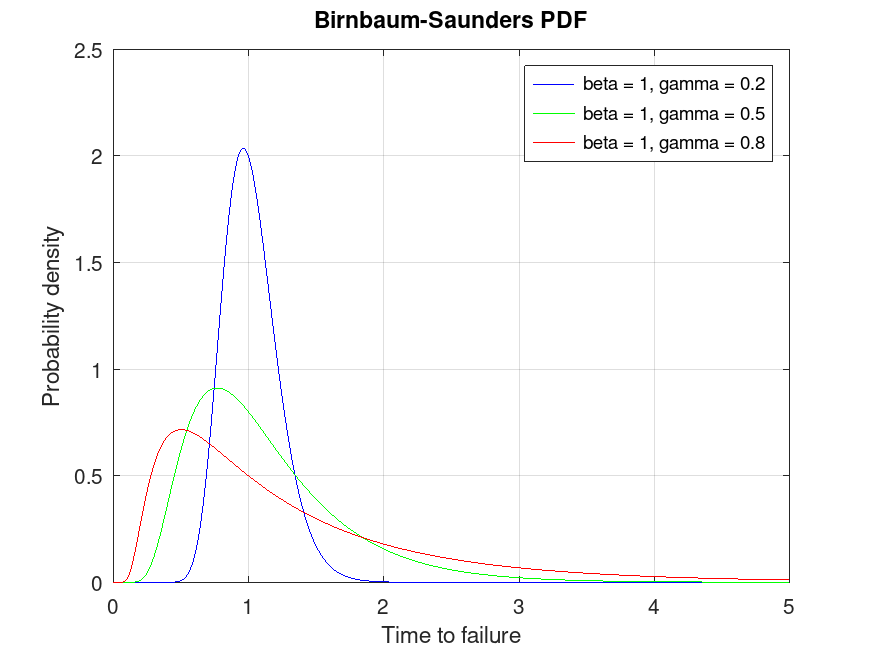
This visualizes the probability density function for Birnbaum-Saunders distributions, showing the likelihood of different times to failure.
BirnbaumSaundersDistribution: plot (pd)
BirnbaumSaundersDistribution: plot (pd, Name, Value)
BirnbaumSaundersDistribution: h = plot (…)
plot (pd) plots a probability density function (PDF) of the
probability distribution object pd. If pd contains data,
which have been fitted by fitdist, the PDF is superimposed over a
histogram of the data.
plot (pd, Name, Value) specifies additional
options with the Name-Value pair arguments listed below.
| Name | Value | |
|---|---|---|
'PlotType' | A character vector specifying the plot
type. 'pdf' plots the probability density function (PDF). When
pd is fit to data, the PDF is superimposed on a histogram of the
data. 'cdf' plots the cumulative density function (CDF). When
pd is fit to data, the CDF is superimposed over an empirical CDF.
'probability' plots a probability plot using a CDF of the data
and a CDF of the fitted probability distribution. This option is
available only when pd is fitted to data. | |
'Discrete' | A logical scalar to specify whether to
plot the PDF or CDF of a discrete distribution object as a line plot or a
stem plot, by specifying false or true, respectively. By
default, it is true for discrete distributions and false
for continuous distributions. When pd is a continuous distribution
object, option is ignored. | |
'Parent' | An axes graphics object for plot. If
not specified, the plot function plots into the current axes or
creates a new axes object if one does not exist. |
h = plot (…) returns a graphics handle to the plotted
objects.
Example: 1
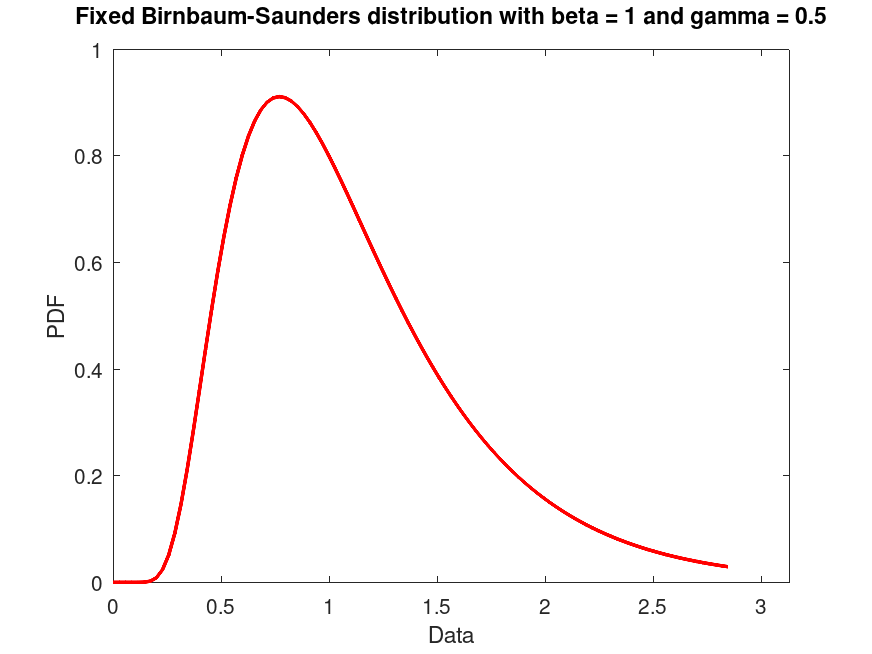
Create a Birnbaum-Saunders distribution with fixed parameters β = 1 and γ = 0.5 and plot its PDF.
pd = makedist ("BirnbaumSaunders", "beta", 1, "gamma", 0.5)
pd =
  BirnbaumSaundersDistribution

  Birnbaum-Saunders distribution
     beta =   1
    gamma = 0.5
 plot (pd)
 title ("Fixed Birnbaum-Saunders distribution with beta = 1 and gamma = 0.5")
Example: 2
Generate a data set of 100 random samples from a Birnbaum-Saunders distribution with parameters β = 1 and γ = 0.5. Fit a Birnbaum-Saunders distribution to this data and plot its CDF superimposed over an empirical CDF.
pd_fixed = makedist ("BirnbaumSaunders", "beta", 1, "gamma", 0.5)
pd_fixed =
  BirnbaumSaundersDistribution

  Birnbaum-Saunders distribution
     beta =   1
    gamma = 0.5
 randg ("seed", 21);
 data = random (pd_fixed, 100, 1);
 pd_fitted = fitdist (data, "BirnbaumSaunders")
pd_fitted =
  BirnbaumSaundersDistribution

  Birnbaum-Saunders distribution
     beta =  1.07336   [0.971323, 1.18611]
    gamma = 0.528129   [0.459781, 0.606637]
 plot (pd_fitted, "PlotType", "cdf")
 txt = "Fitted Birnbaum-Saunders distribution with β = %0.2f and γ = %0.2f";
 title (sprintf (txt, pd_fitted.beta, pd_fitted.gamma))
 legend ({"empirical CDF", "fitted CDF"}, "location", "southeast")
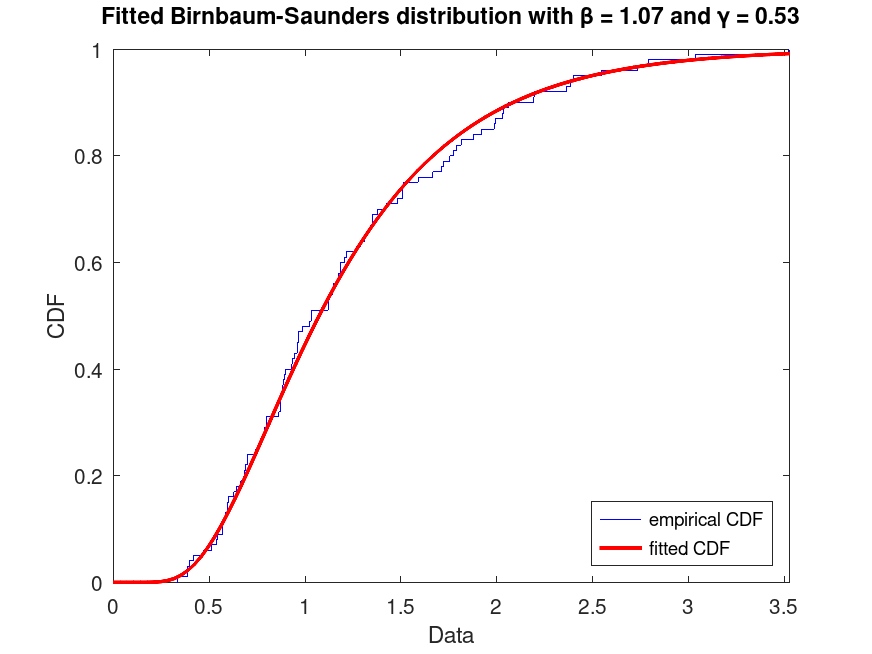
Use this to visualize the fitted CDF compared to the empirical CDF of the data, useful for assessing model fit.
Example: 3
Generate a data set of 200 random samples from a Birnbaum-Saunders distribution with parameters β = 1 and γ = 0.5. Display a probability plot for the Birnbaum-Saunders distribution fit to the data.
pd_fixed = makedist ("BirnbaumSaunders", "beta", 1, "gamma", 0.5)
pd_fixed =
  BirnbaumSaundersDistribution

  Birnbaum-Saunders distribution
     beta =   1
    gamma = 0.5
 randg ("seed", 21);
 data = random (pd_fixed, 200, 1);
 pd_fitted = fitdist (data, "BirnbaumSaunders")
pd_fitted =
  BirnbaumSaundersDistribution

  Birnbaum-Saunders distribution
     beta =  1.07073   [1.00275, 1.14332]
    gamma = 0.487849   [0.442309, 0.538079]
 plot (pd_fitted, "PlotType", "probability")
 txt = strcat ("Probability plot of fitted Birnbaum-Saunders", ...
               " distribution with β = %0.2f and γ = %0.2f");
 title (sprintf (txt, pd_fitted.beta, pd_fitted.gamma))
 legend ({"empirical CDF", "fitted CDF"}, "location", "southeast")
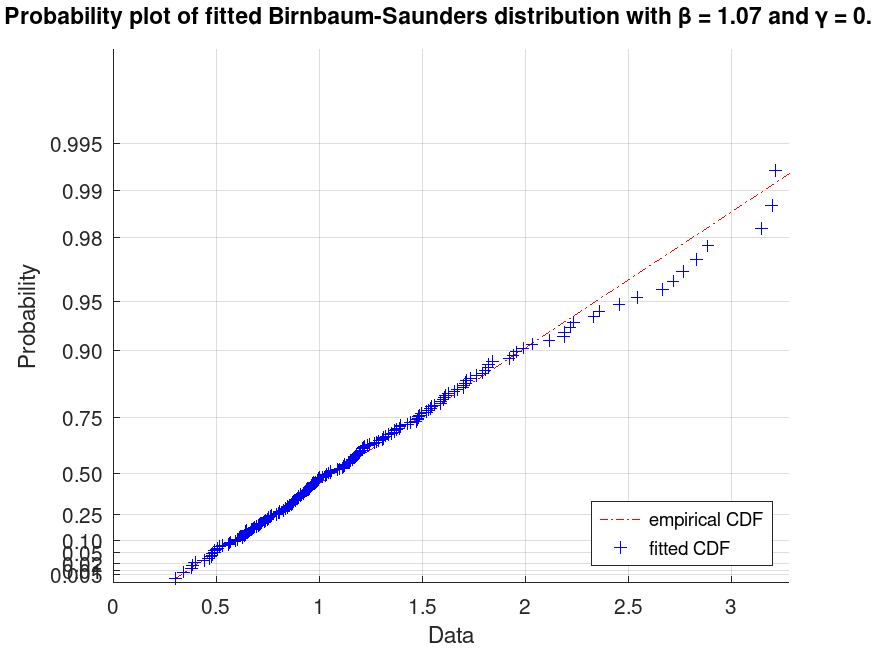
This creates a probability plot to compare the fitted distribution to the data, useful for checking if the Birnbaum-Saunders model is appropriate.
BirnbaumSaundersDistribution: [nlogL, param] = proflik (pd, pnum)
BirnbaumSaundersDistribution: [nlogL, param] = proflik (pd, pnum,
'Display', display)BirnbaumSaundersDistribution: [nlogL, param] = proflik (pd, pnum, setparam)
BirnbaumSaundersDistribution: [nlogL, param] = proflik (pd, pnum, setparam,
'Display', display)
[nlogL, param] = proflik (pd, pnum)
returns a vector nlogL of negative loglikelihood values and a
vector param of corresponding parameter values for the parameter in
the position indicated by pnum. By default, proflik uses
the lower and upper bounds of the 95% confidence interval and computes
100 equispaced values for the selected parameter. pd must be
fitted to data.
[nlogL, param] = proflik (pd, pnum,
also plots the profile likelihood
against the default range of the selected parameter.
'Display', 'on')
[nlogL, param] = proflik (pd, pnum,
 setparam)
defines a user-defined range of the selected parameter.
[nlogL, param] = proflik (pd, pnum,
setparam, also plots the profile
likelihood against the user-defined range of the selected parameter.
'Display', 'on')
For the Birnbaum-Saunders distribution, pnum = 1 selects
the parameter beta and pnum = 2 selects the
parameter gamma.
When opted to display the profile likelihood plot, proflik also
plots the baseline loglikelihood computed at the lower bound of the 95%
confidence interval and estimated maximum likelihood. The latter might
not be observable if it is outside of the used-defined range of parameter
values.
Example: 1
Compute and plot the profile likelihood for the shape parameter of a fitted Birnbaum-Saunders distribution
pd = makedist ("BirnbaumSaunders", "beta", 1, "gamma", 0.5)
pd =
  BirnbaumSaundersDistribution

  Birnbaum-Saunders distribution
     beta =   1
    gamma = 0.5
 randg ("seed", 21);
 data = random (pd, 1000, 1);
 pd_fitted = fitdist (data, "BirnbaumSaunders")
pd_fitted =
  BirnbaumSaundersDistribution

  Birnbaum-Saunders distribution
     beta =  1.01481   [0.98503, 1.04548]
    gamma = 0.495802   [0.474542, 0.518014]
[nlogL, param] = proflik (pd_fitted, 2, "Display", "on");
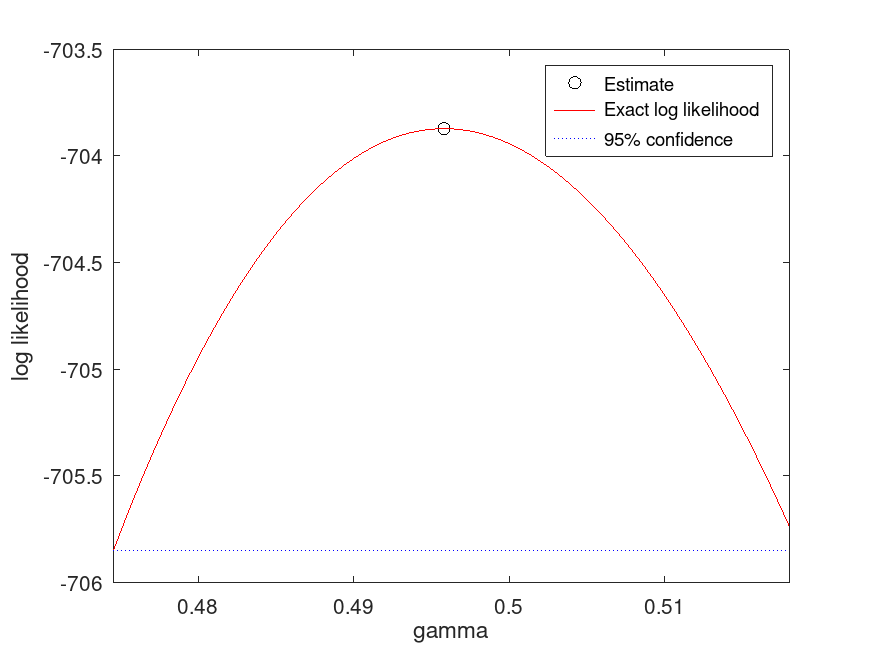
Use this to analyze the profile likelihood of the shape parameter (gamma), helping to understand the uncertainty in parameter estimates.
BirnbaumSaundersDistribution: r = random (pd)
BirnbaumSaundersDistribution: r = random (pd, rows)
BirnbaumSaundersDistribution: r = random (pd, rows, cols, …)
BirnbaumSaundersDistribution: r = random (pd, [sz])
r = random (pd) returns a random number from the
distribution object pd.
When called with a single size argument, bisarnd returns a square
matrix with the dimension specified. When called with more than one
scalar argument, the first two arguments are taken as the number of rows
and columns and any further arguments specify additional matrix
dimensions. The size may also be specified with a row vector of
dimensions, sz.
Example: 1
Generate random samples from a Birnbaum-Saunders distribution
pd = makedist ("BirnbaumSaunders", "beta", 1, "gamma", 0.5)
pd =
  BirnbaumSaundersDistribution

  Birnbaum-Saunders distribution
     beta =   1
    gamma = 0.5
 randg ("seed", 21);
 samples = random (pd, 500, 1);
 hist (samples, 50)
 title ("Histogram of 500 random samples from Birnbaum-Saunders(beta=1, gamma=0.5)")
 xlabel ("Time to failure")
 ylabel ("Frequency")
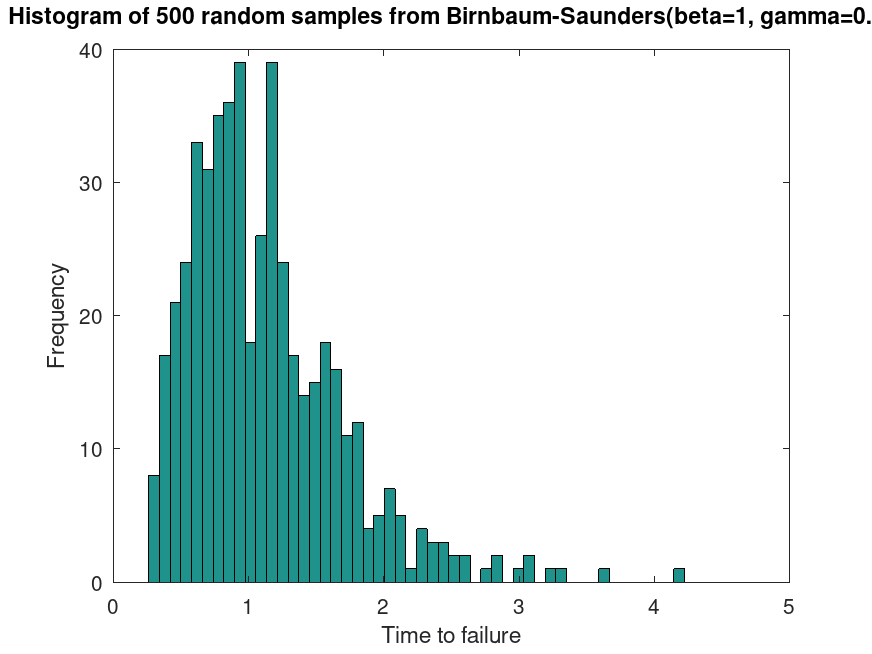
This generates random samples from a Birnbaum-Saunders distribution, useful for simulating time-to-failure data under cyclic loading.
BirnbaumSaundersDistribution: s = std (pd)
s = std (pd) computes the standard deviation of the
probability distribution object, pd.
Example: 1
Compute the standard deviation for a Birnbaum-Saunders distribution
pd = makedist ("BirnbaumSaunders", "beta", 1, "gamma", 0.5)
pd =
  BirnbaumSaundersDistribution

  Birnbaum-Saunders distribution
     beta =   1
    gamma = 0.5
std_value = std (pd)
std_value = 0.5728
Use this to calculate the standard deviation, which measures the variability in time to failure.
BirnbaumSaundersDistribution: t = truncate (pd, lower, upper)
t = truncate (pd, lower, upper) returns a
probability distribution t, which is the probability distribution
pd truncated to the specified interval with lower limit,
lower,
and upper limit, upper. If pd is fitted to data with
fitdist, the returned probability distribution t is not
fitted, does not contain any data or estimated values, and it is as it
has been created with the makedist function, but it includes the
truncation interval.
Example: 1
Plot the PDF of a Birnbaum-Saunders distribution, with parameters beta = 1 and gamma = 0.5, truncated at [0.5, 2] intervals. Generate 10000 random samples from this truncated distribution and superimpose a histogram scaled accordingly
pd = makedist ("BirnbaumSaunders", "beta", 1, "gamma", 0.5)
pd =
  BirnbaumSaundersDistribution

  Birnbaum-Saunders distribution
     beta =   1
    gamma = 0.5
t = truncate (pd, 0.5, 2)
t =
  BirnbaumSaundersDistribution

  Birnbaum-Saunders distribution
     beta =   1
    gamma = 0.5
  Truncated to the interval [0.5, 2]
 randg ("seed", 21);
 data = random (t, 10000, 1);
Plot histogram and fitted PDF
 plot (t)
 hold on
 hist (data, 100, 50)
 hold off
 title ("Birnbaum-Saunders distribution (beta = 1, gamma = 0.5) truncated at [0.5, 2]")
 legend ("Truncated PDF", "Histogram")
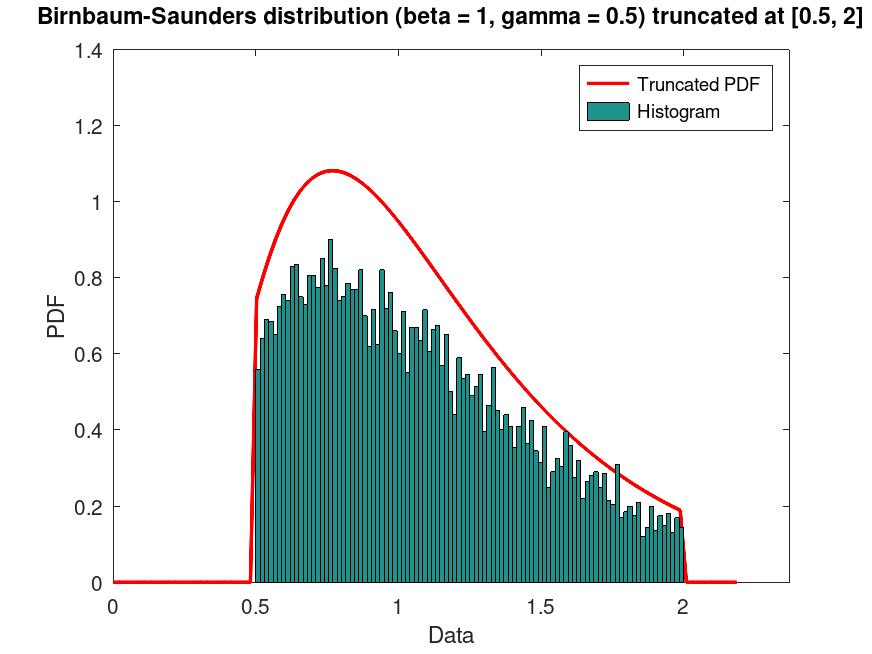
This demonstrates truncating a Birnbaum-Saunders distribution to a specific range and visualizing the resulting distribution with random samples.
BirnbaumSaundersDistribution: v = var (pd)
v = var (pd) computes the variance of the
probability distribution object, pd.
Example: 1
Compute the variance for a Birnbaum-Saunders distribution
pd = makedist ("BirnbaumSaunders", "beta", 1, "gamma", 0.5)
pd =
  BirnbaumSaundersDistribution

  Birnbaum-Saunders distribution
     beta =   1
    gamma = 0.5
var_value = var (pd)
var_value = 0.3281
Use this to calculate the variance, which quantifies the spread of the time to failure in the distribution.
Examples
pd_fixed = makedist ('BirnbaumSaunders', 'beta', 1, 'gamma', 0.5)
pd_fixed =
  BirnbaumSaundersDistribution

  Birnbaum-Saunders distribution
     beta =   1
    gamma = 0.5
 randg ('seed', 21);
 data = random (pd_fixed, 5000, 1);
 pd_fitted = fitdist (data, 'BirnbaumSaunders')
pd_fitted =
  BirnbaumSaundersDistribution

  Birnbaum-Saunders distribution
     beta =  1.00789   [0.994443, 1.02153]
    gamma = 0.500467   [0.490753, 0.510373]
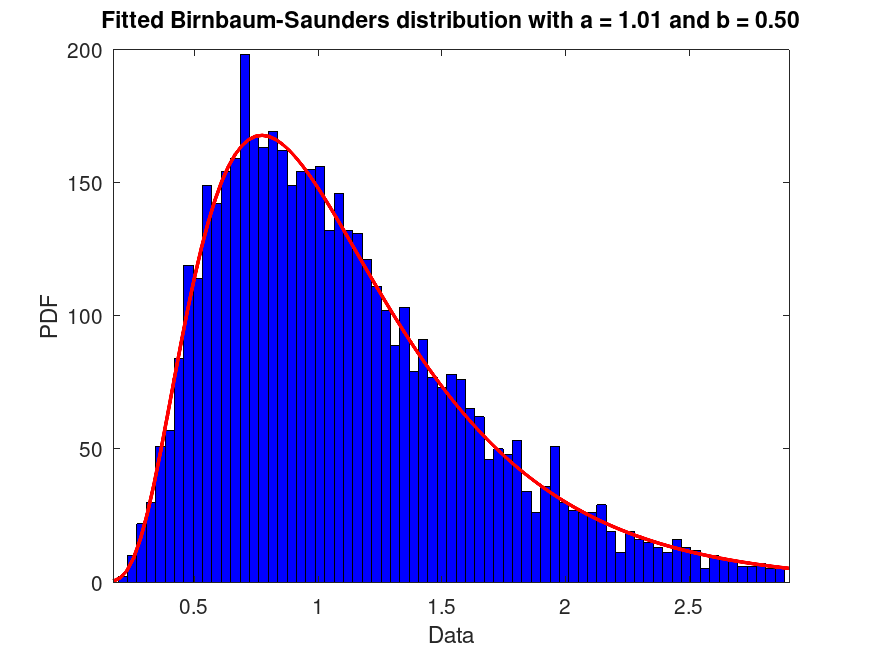
 plot (pd_fitted)
 msg = 'Fitted Birnbaum-Saunders distribution with beta = %0.2f and gamma = %0.2f';
 title (sprintf (msg, pd_fitted.beta, pd_fitted.gamma))