Categories &
Functions List
- adtest
- anova
- anova1
- anova2
- anovan
- ansaribradley
- barttest
- binotest
- chi2gof
- chi2test
- correlation_test
- detectdrift
- dwtest
- fishertest
- friedman
- hotelling_t2test
- hotelling_t2test2
- jbtest
- knntest
- kruskalwallis
- kstest
- kstest2
- lillietest
- manova1
- mcnemar_test
- meanEffectSize
- mmdtest
- multcompare
- ranksum
- regression_ftest
- regression_ttest
- runstest
- signrank
- signtest
- stats.drift.DriftDiagnostics
- swtest
- ttest
- ttest2
- vartest
- vartest2
- vartestn
- ztest
- ztest2
- CompactLinearModel
- CoxModel
- coxphfit
- fitcox
- fitglm
- fitglme
- fitlm
- fitlme
- fitlmematrix
- fitnlm
- fitrm
- GeneralizedLinearMixedModel
- GeneralizedLinearModel
- glmfit
- glmval
- invpred
- lasso
- lassoglm
- LinearFormula
- LinearMixedModel
- LinearModel
- logistic_regression
- mnrfit
- mnrval
- monotone_smooth
- mvregress
- mvregresslike
- nlinfit
- nlparci
- nlpredci
- NonLinearModel
- plsregress
- regress
- regress_gp
- RepeatedMeasuresModel
- ridge
- robustfit
- stepwisefit
- stepwiseglm
- stepwiselm
- ClassificationBaggedEnsemble
- ClassificationDiscriminant
- ClassificationECOC
- ClassificationEnsemble
- ClassificationGAM
- ClassificationKernel
- ClassificationKNN
- ClassificationLinear
- ClassificationNaiveBayes
- ClassificationNeuralNetwork
- ClassificationPartitionedECOC
- ClassificationPartitionedEnsemble
- ClassificationPartitionedKernel
- ClassificationPartitionedLinear
- ClassificationPartitionedModel
- ClassificationSVM
- ClassificationTree
- CompactClassificationDiscriminant
- CompactClassificationECOC
- CompactClassificationEnsemble
- CompactClassificationGAM
- CompactClassificationNaiveBayes
- CompactClassificationNeuralNetwork
- CompactClassificationSVM
- CompactClassificationTree
- CompactRegressionGAM
- CompactRegressionEnsemble
- CompactRegressionGP
- CompactRegressionNeuralNetwork
- CompactRegressionSVM
- CompactRegressionTree
- CompactTreeBagger
- designecoc
- fcnnpredict
- fcnntrain
- fitcdiscr
- fitcecoc
- fitcensemble
- fitcgam
- fitckernel
- fitcknn
- fitclinear
- fitcnb
- fitcnet
- fitcsvm
- fitctree
- fitrensemble
- fitrgam
- fitrgp
- fitrkernel
- fitrlinear
- fitrnet
- fitrsvm
- fitrtree
- gamboostinter
- gamboostpairs
- gamboostpredict
- gamboosttrain
- gampredict
- gamtrain
- partialDependence
- plotPartialDependence
- PredictiveModel
- RegressionBaggedEnsemble
- RegressionEnsemble
- RegressionGAM
- RegressionGP
- RegressionKernel
- RegressionLinear
- RegressionNeuralNetwork
- RegressionPartitionedEnsemble
- RegressionPartitionedKernel
- RegressionPartitionedLinear
- RegressionPartitionedModel
- RegressionSVM
- RegressionTree
- lime
- shapley
- svmpredict
- svmtrain
- templateDiscriminant
- templateEnsemble
- templateKernel
- templateKNN
- templateLinear
- templateNaiveBayes
- templateSVM
- templateTree
- TreeBagger
- treepredict
- treetrain
- paretotails
- prob.ProbabilityDistribution
- prob.BetaDistribution
- prob.BinomialDistribution
- prob.BirnbaumSaundersDistribution
- prob.BurrDistribution
- prob.ExponentialDistribution
- prob.ExtremeValueDistribution
- prob.GammaDistribution
- prob.GeneralizedExtremeValueDistribution
- prob.GeneralizedParetoDistribution
- prob.HalfNormalDistribution
- prob.InverseGaussianDistribution
- prob.KernelDistribution
- prob.LogisticDistribution
- prob.LoglogisticDistribution
- prob.LognormalDistribution
- prob.LoguniformDistribution
- prob.MultinomialDistribution
- prob.NakagamiDistribution
- prob.NegativeBinomialDistribution
- prob.NormalDistribution
- prob.PiecewiseLinearDistribution
- prob.PoissonDistribution
- prob.RayleighDistribution
- prob.RicianDistribution
- prob.StableDistribution
- prob.tLocationScaleDistribution
- prob.TriangularDistribution
- prob.UniformDistribution
- prob.WeibullDistribution
- betafit
- betalike
- binofit
- binolike
- bisafit
- bisalike
- burrfit
- burrlike
- copulafit
- evfit
- evlike
- expfit
- explike
- gamfit
- gamlike
- geofit
- gevfit
- gevlike
- gevfit_lmom
- gpfit
- gplike
- gumbelfit
- gumbellike
- hnfit
- hnlike
- invgfit
- invglike
- logifit
- logilike
- loglfit
- logllike
- lognfit
- lognlike
- nakafit
- nakalike
- nbinfit
- nbinlike
- normfit
- normlike
- poissfit
- poisslike
- raylfit
- rayllike
- ricefit
- ricelike
- stblfit
- stbllike
- tlsfit
- tlslike
- unidfit
- unifit
- wblfit
- wbllike
- betacdf
- betainv
- betapdf
- betarnd
- binocdf
- binoinv
- binopdf
- binornd
- bisacdf
- bisainv
- bisapdf
- bisarnd
- burrcdf
- burrinv
- burrpdf
- burrrnd
- bvncdf
- bvtcdf
- cauchycdf
- cauchyinv
- cauchypdf
- cauchyrnd
- chi2cdf
- chi2inv
- chi2pdf
- chi2rnd
- copulacdf
- copulapdf
- copularnd
- evcdf
- evinv
- evpdf
- evrnd
- expcdf
- expinv
- exppdf
- exprnd
- fcdf
- finv
- fpdf
- frnd
- gamcdf
- gaminv
- gampdf
- gamrnd
- geocdf
- geoinv
- geopdf
- geornd
- gevcdf
- gevinv
- gevpdf
- gevrnd
- gpcdf
- gpinv
- gppdf
- gprnd
- gumbelcdf
- gumbelinv
- gumbelpdf
- gumbelrnd
- hncdf
- hninv
- hnpdf
- hnrnd
- hygecdf
- hygeinv
- hygepdf
- hygernd
- invgcdf
- invginv
- invgpdf
- invgrnd
- iwishpdf
- iwishrnd
- jsucdf
- jsupdf
- laplacecdf
- laplaceinv
- laplacepdf
- laplacernd
- logicdf
- logiinv
- logipdf
- logirnd
- loglcdf
- loglinv
- loglpdf
- loglrnd
- logncdf
- logninv
- lognpdf
- lognrnd
- mnpdf
- mnrnd
- mvncdf
- mvnpdf
- mvnrnd
- mvtcdf
- mvtpdf
- mvtrnd
- nakacdf
- nakainv
- nakapdf
- nakarnd
- nbincdf
- nbininv
- nbinpdf
- nbinrnd
- ncfcdf
- ncfinv
- ncfpdf
- ncfrnd
- nctcdf
- nctinv
- nctpdf
- nctrnd
- ncx2cdf
- ncx2inv
- ncx2pdf
- ncx2rnd
- normcdf
- norminv
- normpdf
- normrnd
- plcdf
- plinv
- plpdf
- plrnd
- poisscdf
- poissinv
- poisspdf
- poissrnd
- raylcdf
- raylinv
- raylpdf
- raylrnd
- ricecdf
- riceinv
- ricepdf
- ricernd
- stblcdf
- stblinv
- stblpdf
- stblrnd
- stdrcdf
- stdrinv
- stdrpdf
- stdrrnd
- tcdf
- tinv
- tpdf
- trnd
- tlscdf
- tlsinv
- tlspdf
- tlsrnd
- tricdf
- triinv
- tripdf
- trirnd
- unidcdf
- unidinv
- unidpdf
- unidrnd
- unifcdf
- unifinv
- unifpdf
- unifrnd
- vmcdf
- vminv
- vmpdf
- vmrnd
- wblcdf
- wblinv
- wblpdf
- wblrnd
- wienrnd
- wishpdf
- wishrnd
- betastat
- binostat
- bisastat
- burrstat
- chi2stat
- copulaparam
- copulastat
- evstat
- expstat
- fstat
- gamstat
- geostat
- gevstat
- gpstat
- gumbelstat
- hnstat
- hygestat
- invgstat
- logistat
- loglstat
- lognstat
- nakastat
- nbinstat
- ncfstat
- nctstat
- ncx2stat
- normstat
- plstat
- poisstat
- raylstat
- ricestat
- stdrstat
- tlsstat
- tristat
- tstat
- unidstat
- unifstat
- wblstat
- andrewsplot
- bar3
- bar3h
- biplot
- boxchart
- boxplot
- cdfplot
- dendrogram
- ecdfhist
- einstein
- gardnerAltmanPlot
- glyphplot
- gplotmatrix
- gscatter
- heatmap
- hist3
- histfit
- manovacluster
- normplot
- parallelcoords
- parallelplot
- ppplot
- probplot
- qqplot
- scatterhist
- scatterhistogram
- silhouette
- stats.chart.BoxChart
- stats.chart.HeatmapChart
- stats.chart.ParallelCoordinatesPlot
- stats.chart.ScatterHistogramChart
- swarmchart
- violin
- wblplot
Function Reference: anova1
statistics: p = anova1 (x)
statistics: p = anova1 (x, group)
statistics: p = anova1 (x, group, displayopt)
statistics: p = anova1 (x, group, displayopt, vartype)
statistics: [p, atab] = anova1 (x, …)
statistics: [p, atab, stats] = anova1 (x, …)
Perform a one-way analysis of variance (ANOVA) for comparing the means of two
or more groups of data under the null hypothesis that the groups are drawn
from distributions with the same mean. For planned contrasts and/or
diagnostic plots, use anovan instead.
anova1 can take up to three input arguments:
-
x contains the data and it can either be a vector or matrix.
If x is a matrix, then each column is treated as a separate group.
If x is a vector, it is a single group whichever way it lies, unless
group is given; with one group there is nothing to compare, so
p is
NaN. - group contains the names for each group. If x is a matrix, then group can either be a cell array of strings of a character array, with one row per column of x. If you want to omit this argument, enter an empty array ([]). If x is a vector, then group must be a vector of the same length, or a string array or cell array of strings with one row for each element of x. x values corresponding to the same value of group are placed in the same group.
- displayopt is an optional parameter for displaying the groups contained in the data in a boxplot. If omitted, it is ’on’ by default. If group names are defined in group, these are used to identify the groups in the boxplot. Use ’off’ to omit displaying this figure.
-
vartype is an optional parameter to used to indicate whether the
groups can be assumed to come from populations with equal variance. When
vartypeis'equal'the variances are assumed to be equal (this is the default). Whenvartypeis'unequal'the population variances are not assumed to be equal and Welch’s ANOVA test is used instead.vartype is an Octave extension: MATLAB’s
anova1takes no fourth argument. It does not error on one either, it accepts it and ignores it, returning the same p and F for'unequal'as for'equal'. Code written against this function and then run in MATLAB therefore gets the classic ANOVA silently, with no diagnostic of any kind. Note thatanova2’s analogous fourth argument does make MATLAB error, so the silence here is particular toanova1.
anova1 can return up to three output arguments:
- p is the p-value of the null hypothesis that all group means are equal.
-
atab is a cell array containing the results in a standard ANOVA table.
Its first row holds the column headings. For
'equal'it is the classic partition,'Source','SS','df','MS','F'and'Prob>F', with a row for the groups, the error and the total. For'unequal'it is'Source','F','df','dfe'and'Prob>F', with one row for the groups, since Welch’s test partitions no sum of squares and pools no error term;'df'and'dfe'are the numerator and the denominator degrees of freedom of its F statistic, the latter fractional. The two tables therefore differ in width and in what their columns mean. - stats is a structure containing statistics useful for performing a multiple comparison of means with the MULTCOMPARE function.
A categorical group may declare levels that no observation uses.
Such a level takes no part in the analysis and is dropped from every field
of stats, so n, means and gnames always describe
the same groups, in the same order, and can be indexed together.
This is a deliberate deviation from MATLAB, which drops an unused level
from gnames but keeps it in n and means as a count of
zero and a mean of NaN. Those fields then disagree in length and
the group indices run past gnames, so MATLAB’s own multcompare
reports comparisons against a group holding no observations and labels them
with indices that its gnames cannot resolve.
If anova1 is called without any output arguments, then it prints the results in a one-way ANOVA table to the standard output. It is also printed when displayopt is ’on’.
Examples:
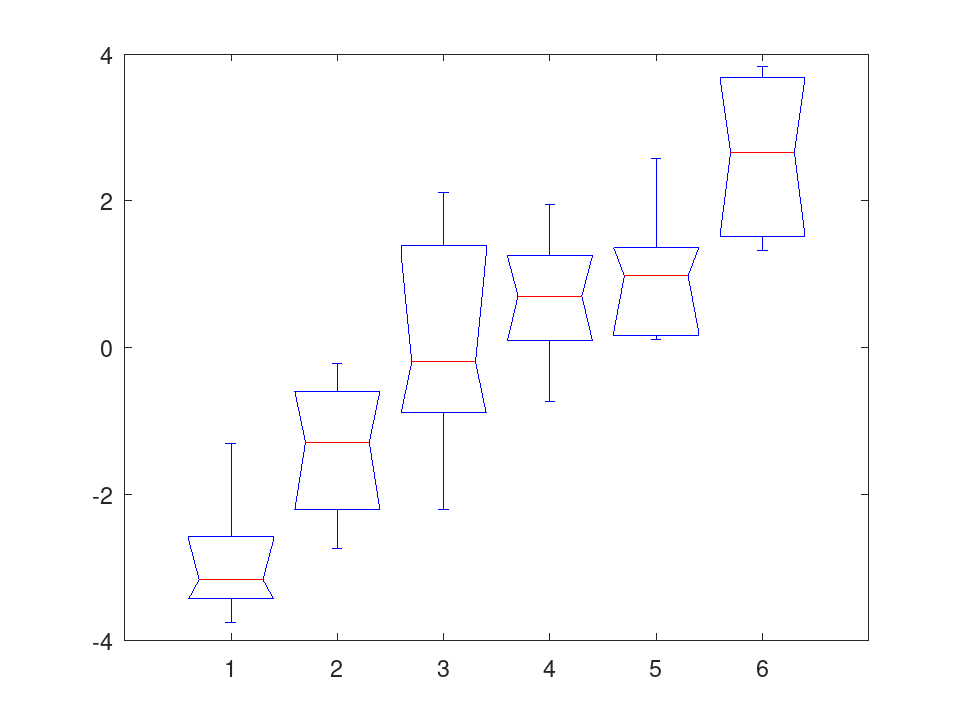
x = meshgrid (1:6); x = x + normrnd (0, 1, 6, 6); anova1 (x, [], 'off'); [p, atab] = anova1(x); |
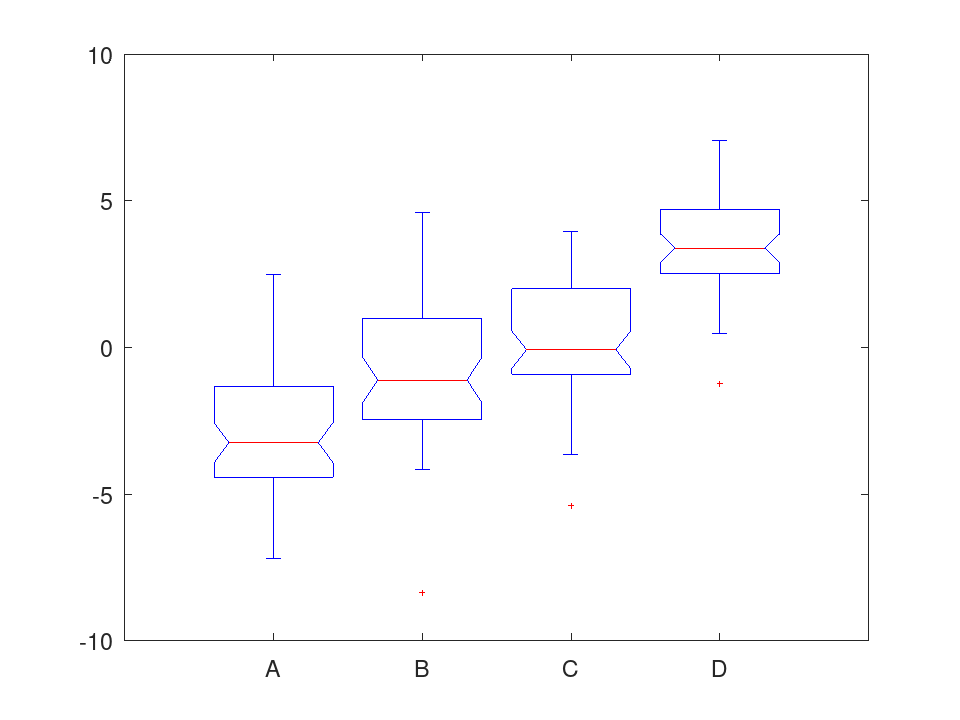
 x = ones (50, 4) .* [-2, 0, 1, 5];
 x = x + normrnd (0, 2, 50, 4);
 groups = {"A", "B", "C", "D"};
 anova1 (x, groups);
|
See also: anova2, anovan, multcompare
Source Code: anova1
 rng (42);
 x = meshgrid (1:6);
 x = x + normrnd (0, 1, 6, 6);
 anova1 (x, [], 'off');
                      ANOVA Table

Source        SS      df        MS       F      Prob>F
------------------------------------------------------
Groups    111.9398     5    22.3880    18.42    0.0000
Error      36.4629    30     1.2154
Total     148.4027    35
 rng (42);
 x = meshgrid (1:6);
 x = x + normrnd (0, 1, 6, 6);
 [p, atab] = anova1 (x);
                      ANOVA Table

Source        SS      df        MS       F      Prob>F
------------------------------------------------------
Groups    111.9398     5    22.3880    18.42    0.0000
Error      36.4629    30     1.2154
Total     148.4027    35
 rng (42);
 x = ones (50, 4) .* [-2, 0, 1, 5];
 x = x + normrnd (0, 2, 50, 4);
 groups = {'A', 'B', 'C', 'D'};
 anova1 (x, groups);
                      ANOVA Table

Source        SS      df        MS       F      Prob>F
------------------------------------------------------
Groups   1037.3570     3   345.7857    81.63    0.0000
Error     830.2136   196     4.2358
Total    1867.5706   199
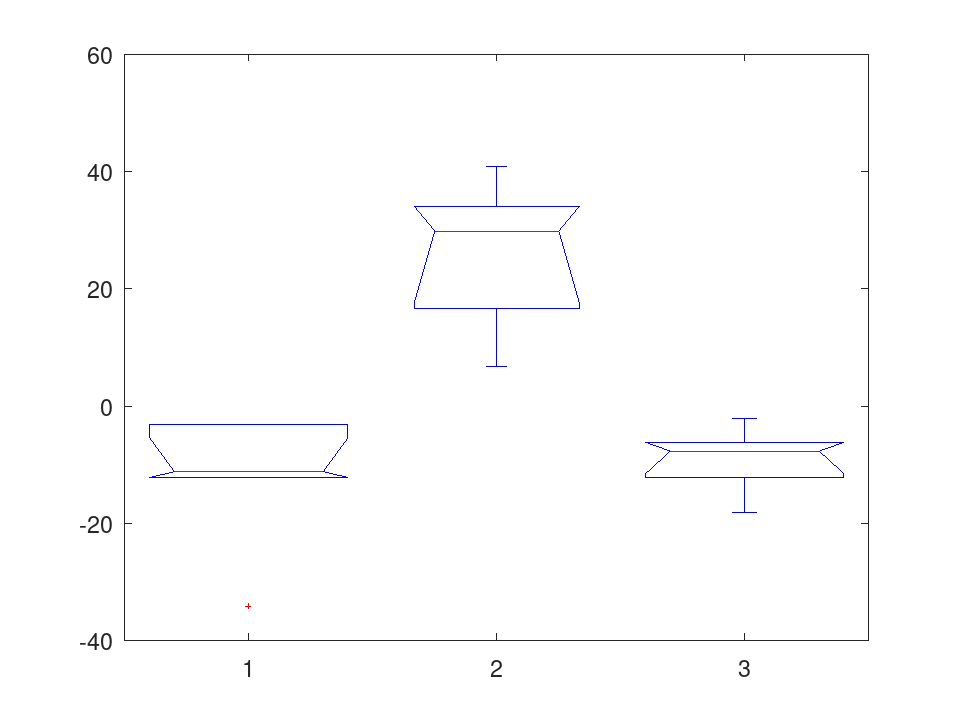
 y = [54 87 45; 23 98 39; 45 64 51; 54 77 49; 45 89 50; 47 NaN 55];
 g = [1  2  3 ; 1  2  3 ; 1  2  3 ; 1  2  3 ; 1  2  3 ; 1  2  3 ];
 anova1 (y(:), g(:), 'on', 'unequal');
           Welch's ANOVA Table

Source        F     df     dfe     Prob>F
-----------------------------------------
Groups     15.52     2    7.58     0.0021